


Fast Downloader - Video Player
4.260.00 Reviews
App Specs
- Version
- 2.5.2
- Updated On
- License
- Free
- Downloads
- 1,000,000+
- Developer
- Dhvankit
- Categories
- Video Players & Editors
- Platform
- Android
Screenshots
 Analysis by AppCompare
When a link refuses to turn into a saved video, it is easy to blame the downloader straight away. I’d first check whether the page actually exposes a video the app can retrieve: a link to a post, a sign-in screen, or a page that streams content in a complicated way may behave differently from a direct video page. That distinction matters with Fast Downloader - Video Player, because a simple download workflow is most useful when the source itself is accessible and compatible.
I find this kind of tool most helpful for a specific job: keeping a video available for a commute, a trip, or a place where mobile reception is unreliable. It is less compelling if I only watch clips once and have no reason to store them. Before relying on an offline copy, I’d also make sure I’m allowed to save the material and use it in the way I intend; convenience does not replace the creator’s or site’s rules.
Check the source before troubleshooting the app
A sensible first check is to open the original page and confirm that it loads normally. If the page is asking you to sign in, has expired, or does not play in the browser, pasting its address into a downloader is unlikely to fix the underlying problem. I would try a video page that I can already view, rather than repeatedly submitting the same troublesome link.
It also helps to copy the address from the page itself instead of a shortened share link or a link that points to a profile or collection. A share URL can lead to several layers of redirects before it reaches the actual video. If the app does not recognize it, opening the destination first and copying the more direct page address is a practical test, not a guarantee that every site will work.
Small setup checks that save time
For a first download, I’d keep the process simple: confirm that the source opens, copy its link carefully, and check the selected quality before starting. If a download does not begin, I would avoid tapping repeatedly. That can leave me unsure whether the first request is still active or whether I have started several attempts.
Storage is another easy thing to overlook. A higher-quality copy generally takes more room than a smaller one, so I’d choose based on how I plan to watch it. A short clip meant for a quick reference does not need the same quality as a video I expect to view on a larger screen. Choosing modestly can help prevent a useful download from crowding out other files.
Network conditions can make a fast downloader feel slow. On a weak or interrupted connection, waiting briefly or switching to a steadier network is more useful than changing settings at random. If only one source is failing, I’d suspect the page or its link first; if several accessible pages fail in the same way, then checking the app’s current state and trying again later is a more measured next step.
Worth Reading Before You Choose

Flipboard Shows What News Apps Must Do Beyond the Feed

Switching to Android Auto Means Rethinking Your Driving Routine

Google Calendar Makes a Crowded Week Easier to Manage

Ludo King Makes the Most of the Minutes Between Plans

Baby Panda World Brings Quick Play to Modern Phones, but Its Game Library Feels Busy

ESPN’s Live Game View Makes Following Close Games Easier
Recovering a stalled or interrupted download
If a download stops partway through, the download manager described for the app gives you a place to inspect its progress and use pause, resume, or cancel controls. I’d check whether the item is still active before starting it again. When a connection has dropped, resuming an existing task is usually a cleaner workflow than creating duplicates, though the result still depends on the source and the connection.
If the file is incomplete or will not play, I would not assume the video player is broken. The download may not have finished, or the source may have returned something other than a playable video. I’d check the task status, remove a clearly failed attempt if needed, and retry once with a stable connection. Repeating the same failed link over and over is unlikely to provide new information.
When the problem is outside the app
Some pages restrict access, change how their videos are delivered, or require an account before playback. Those conditions can prevent a downloader from reaching the media even when the address looks correct. If a video is available only inside a service’s own app, that official app’s offline option, when offered, may be a better fit than trying to transfer the video through a separate tool.
There is also a difference between saving a file and having the right to redistribute it. I’d use downloads for personal, permitted viewing, and I would not treat the ability to save a clip as permission to repost it. That practical boundary is worth keeping in mind, especially for public clips that are easy to share onward.
Who benefits from this kind of workflow?
This approach suits someone who already knows which videos they want and prefers to prepare them ahead of time. For example, I might save a cooking demonstration before heading to a kitchen with unreliable Wi-Fi, then use the built-in player to revisit a particular step without reloading the page. A traveler could similarly prepare a few permitted videos before leaving home, keeping the process deliberate rather than trying to download everything they encounter.
It is less suitable for someone who mainly streams from subscription services, needs guaranteed access to every website, or expects a downloader to bypass sign-in and access restrictions. In those situations, official offline playback or simply bookmarking the page is often more dependable. The right choice depends on whether the goal is a locally saved file or convenient access inside the service where the video lives.
Against the usual alternatives, a browser’s built-in save option is simpler when the website provides one, while a dedicated media player may offer a better fit for a large existing library. A downloader with an integrated player is appealing when the same app can handle both steps, but that convenience is not a reason to replace a service’s own playback tools when they meet the need. I’d treat this as a focused utility rather than an all-purpose media system.
There are a few useful habits that make the workflow less messy. I’d give files recognizable names or sort them into folders if the app’s organization tools are available, rather than letting a growing collection become a pile of indistinguishable clips. I’d also review saved videos occasionally and remove ones I no longer need; keeping a local copy is useful, but keeping every temporary download can consume space without adding value.
Getting Started with Fast Downloader
Alright, first things first, getting this app up and running is as smooth as butter. Whether you’re on Android or iOS, downloading and installing is a breeze. Just a quick search in the app store, a tap on the download button, and you’re all set.
Once you open the app, you’re greeted with a clean, straightforward interface. It’s got that no-nonsense vibe that I really appreciate when I’m just trying to get things done without a hassle. The main screen has all the essentials laid out neatly, so you won’t find yourself lost in a maze of options.
Downloading Videos: Simple and Fast
Now, the real magic happens when you start downloading. The app supports a wide range of websites, so whether it’s a hilarious meme from social media or a tutorial from your favorite site, you’re covered. Simply paste the video link into the app, hit the download button, and watch it work its magic.
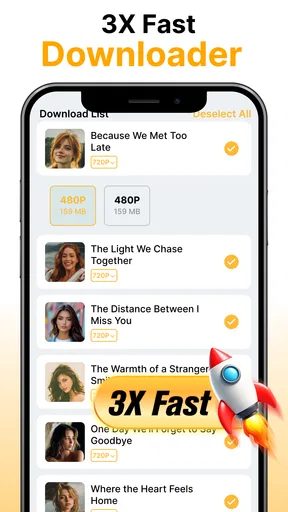
The download speed is impressive, living up to its "Fast" name. No more waiting around for ages to grab a video. What’s even cooler is the option to choose the video quality before downloading. So, if you’re low on storage, you can opt for a lower resolution, or if you’re all about that HD life, go for the high-quality version.
Playing Videos: A Seamless Experience
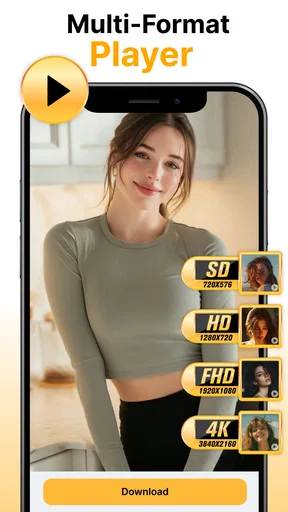
Once you’ve got your videos downloaded, Fast Downloader - Video Player doesn’t just leave you hanging. It comes with a built-in video player that supports various formats, so no need for any extra apps cluttering your phone.
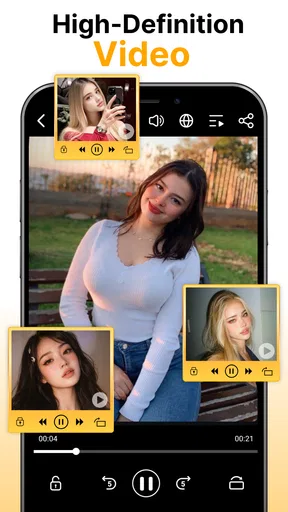
The player is intuitive and user-friendly. You get all the usual controls like play, pause, rewind, and forward, plus some added perks like speed adjustment and subtitle support. The playback is smooth, with no annoying lags or crashes, making it a joy to use.
Additional Features Worth Mentioning
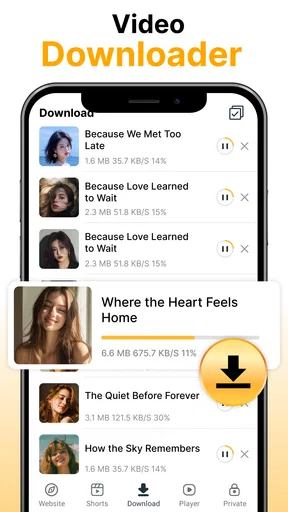
Beyond the basics, the app packs some nifty features that add to its appeal. For instance, there’s a handy download manager where you can track your download progress, pause, resume, or even cancel downloads if you change your mind.
Another cool feature is the ability to organize your downloaded content. You can sort videos into folders right within the app, making it easier to keep track of everything. Plus, there’s a password protection option, which is a neat touch for those videos you’d prefer to keep private.
How it fits into everyday viewing
For a practical routine, I would use the app as a bridge between finding a video and watching it later: identify a clip I’m permitted to save, check that the page works, choose an appropriate quality, and let the download complete before I leave a reliable connection. That sequence is more dependable than waiting until I’m already offline to discover the link cannot be reached.
The choice of quality is a trade-off, not simply a “best” setting. Smaller files make sense for brief reference clips or when I expect to watch on a phone. Higher quality is more worthwhile for detailed demonstrations, where small text or hand movements matter. If I’m uncertain, I’d start with one representative video and see whether its quality is comfortable before saving a whole set.
People often wonder whether the app can handle a video that plays on a site but will not download. The honest answer is that playback in a browser does not automatically mean the media is available to a separate downloader. I’d test a straightforward page and avoid assuming that a failed protected or account-based source indicates a general fault. For those services, their own app is usually the more reliable route.
What the app is—and is not—best at
Fast Downloader - Video Player is a free video tool from Dhvankit in the Video Players & Editors category. It has an average rating of 4.4 from around 13 thousand ratings and has passed over a million installs. It is marked Teen, was released on October 23, 2025, and its current version is 2.5.2, with Android 8.0 as the minimum operating system requirement.
That context makes it look like a well-used option, but popularity does not answer the most important question: whether it fits your sources and habits. I’d consider it if I regularly need permitted videos offline and appreciate having downloads and playback together. I would skip it if I want a universal solution for streaming platforms, expect every link to work, or already have a player and a simpler way to save the files I’m allowed to keep.
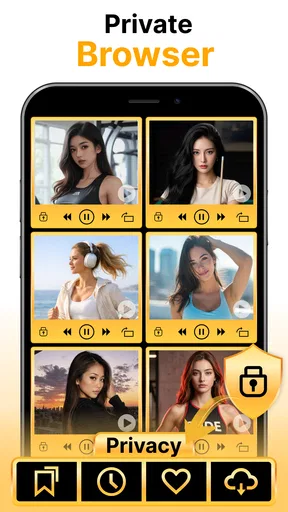
Privacy-minded users should also make a deliberate choice about what they store. The app’s privacy-oriented positioning may appeal to people who want local access, and the password protection mentioned among its features can be useful for keeping selected content less exposed within the app. I would still use a device lock and be thoughtful about shared devices; an in-app safeguard should not be treated as a substitute for basic account and device security.
Final Thoughts
So, is Fast Downloader - Video Player worth your time? Absolutely! It’s a solid app that delivers on its promises without overcomplicating things. From its fast download speeds to its versatile video player, it’s got everything you need to enjoy your favorite videos offline.
Whether you’re a video hoarder, a meme enthusiast, or just someone who likes to have their content on hand, this app makes it easy and enjoyable. Give it a shot, and you might just wonder how you ever got by without it!
And there you have it, folks! I hope this review helps you decide if Fast Downloader - Video Player is the app you’ve been waiting for. Happy downloading!
Pros
- Supports multiple video formats.
- Fast download speeds.
- User-friendly interface.
- Integrated video player.
- No registration required.
Cons
- Contains ads during use.
- No offline mode available.
- Limited editing features.
- Requires stable internet connection.
- No cloud sync option.
FAQs for Fast Downloader - Video Player
What is Fast Downloader - Video Player used for?
Fast Downloader - Video Player is designed to help users download and play videos from various online platforms quickly and efficiently. It supports multiple formats, allowing users to save videos directly to their devices for offline viewing. The app also includes features such as a built-in browser, playlist creation, and video management tools.
Is Fast Downloader - Video Player safe to use?
Yes, Fast Downloader - Video Player is safe to use, provided it is downloaded from a reputable source such as the Google Play Store or Apple App Store. The app does not require intrusive permissions, ensuring user data and privacy are protected. Always ensure your device’s security settings are up to date to prevent any unauthorized access.
Does Fast Downloader - Video Player support all video formats?
The app supports a wide range of popular video formats including MP4, AVI, MOV, and more. It is designed to offer compatibility with most formats to provide users with a seamless experience. However, some less common formats may require conversion using third-party software before viewing.
Can I use Fast Downloader - Video Player on both Android and iOS devices?
Yes, Fast Downloader - Video Player is available for both Android and iOS devices. It is optimized to run smoothly on both platforms, offering similar features and performance. Ensure your device meets the app’s system requirements for optimal functionality.
Are there any in-app purchases in Fast Downloader - Video Player?
Fast Downloader - Video Player offers a free version with basic features. However, there are in-app purchases available for users who wish to unlock premium features such as ad-free experience, enhanced download speeds, and additional format support. Users can choose according to their needs and preferences.


